
Cloud Storage For Xenforo2 2.3.11.0.0
- Seller lutish
- Creation date
Use google cloud storage,cloudflare R2,amzon S3,local folder,FTP/Sftp for your xenforo

Lutish CloudStorage is a professional attachment storage optimization add-on
Overview Releases (1)
Lutish CloudStorage is a professional attachment storage optimization add-on built for XenForo 2.2+. It offloads all forum attachments from your local server to various remote cloud and file storage backends, significantly reducing local disk usage. Combined with CDN delivery, it greatly improves global attachment loading speed and overall visitor experience.
1. Multi-Type Storage Backend Support
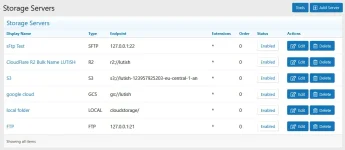
The add-on supports 6 mainstream storage backends, covering traditional file servers, public cloud services, and local directories to fit diverse deployment scenarios. Full custom file structure control is available for all backends:
Fully customize directory templates (Y/m/d, id % 1000, etc.) and filename templates (id_hash.ext, date_filename, etc.) to organize remote files with full flexibility for easier management and traceability.
2. Stable & Intelligent File Upload Engine
Dual upload modes adapt to different server environments, with built-in protection mechanisms to ensure stable and smooth file uploads:
3. Core Exclusive Features
Optimized for multi-server deployments, solving common pain points such as service conflicts, complicated migration, and residual remote junk files:
4. Zero-Downtime Migration & Import
Supports 3 mainstream import sources for seamless bulk migration without forum downtime or user access interruption:
All migration tasks support dry-run preview to verify file counts and detect unsynced files before official execution. An optional thumbnail repair flag regenerates missing thumbnails and optimizes all images to WebP format for faster loading performance.
user guide:
1. Multi-Type Storage Backend Support
The add-on supports 6 mainstream storage backends, covering traditional file servers, public cloud services, and local directories to fit diverse deployment scenarios. Full custom file structure control is available for all backends:
- FTP/FTPS/SFTP/SFTPS: Supports active/passive mode and automatic directory creation for traditional self-hosted file servers
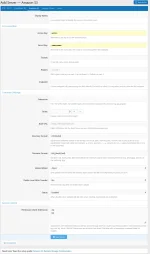
- Amazon S3: Compatible with AWS S3 and all S3-compliant services (MinIO, DigitalOcean Spaces, etc.)
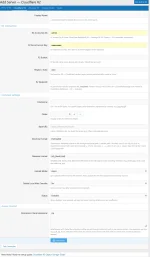
- Cloudflare R2: Zero-egress-fee object storage to minimize operational costs
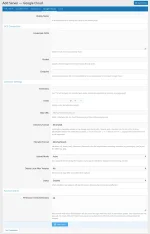
- Google Cloud Storage (GCS): Service account JSON authentication with isolated bucket-level permissions for enhanced security
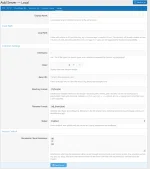
- Local Directory: Supports absolute and relative path resolution for special local storage setups
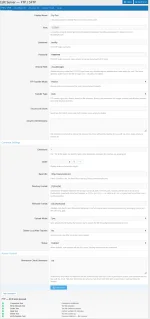
Fully customize directory templates (Y/m/d, id % 1000, etc.) and filename templates (id_hash.ext, date_filename, etc.) to organize remote files with full flexibility for easier management and traceability.
2. Stable & Intelligent File Upload Engine
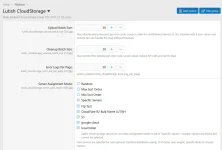
Dual upload modes adapt to different server environments, with built-in protection mechanisms to ensure stable and smooth file uploads:
- Synchronous Mode: Finishes uploads inline before page response, ideal for low-latency storage backends with instant validation
- Asynchronous Mode: Offloads upload tasks to a cron-based queue, decoupling page rendering from remote I/O to avoid lag and timeout issues. Attachment metadata is saved immediately, ensuring all attachment links work properly during ongoing uploads
- Multi-Layer Protection: Includes memory threshold throttling, error-rate circuit breaker, and queue overload detection with 60-second cooldown to prevent queue congestion and server instability during bulk uploads
- Accurate MIME Detection: Uses native finfo-based file type validation with filename extension fallback to avoid upload failures and file corruption caused by incorrect type recognition
3. Core Exclusive Features
Optimized for multi-server deployments, solving common pain points such as service conflicts, complicated migration, and residual remote junk files:
- Fully Customizable Load Balancing: Freely configure load balancing rules to distribute upload, access, and download requests evenly across multiple storage servers, preventing single-server overload and improving overall system stability
- Isolated Multi-Server Operation: All configured storage servers run independently without mutual interference. Configurations, file data, and operating states are fully isolated — failures on one server will not affect others
- Cross-Server File Transfer: Support one-click migration or file copying between any two storage backends (regardless of type). Cross-platform and cross-backend data transfer is fully supported for flexible storage adjustment
- Automatic Remote File Deletion: Syncs perfectly with XenForo’s native logic. When you delete posts, attachments, or user content in the XenForo front-end or back-end, the system automatically generates and schedules deletion jobs to remove matching files on remote storage, eliminating orphaned files and saving disk space without manual maintenance
4. Zero-Downtime Migration & Import
Supports 3 mainstream import sources for seamless bulk migration without forum downtime or user access interruption:
- BD Attachment Store Import: Auto-detects existing BD Attachment Store data, adapts pre/post-2022-02-28 date formats, and maps original FTP profiles for smooth migration
- Lutish RemoteFtp Import: Natively supports migrating all attachments from the legacy Lutish RemoteFtp add-on to the new CloudStorage backend
- Default XF Local Import: Bulk imports original XenForo attachments from data/ and internal_data/ to any remote storage server
All migration tasks support dry-run preview to verify file counts and detect unsynced files before official execution. An optional thumbnail repair flag regenerates missing thumbnails and optimizes all images to WebP format for faster loading performance.
user guide: